
微信小程序前端页面之-现场案例
2024-05-21Web前端
微信小程序开发过程中,用到了,栏目点击-对应相关产品得页面,根据api返回接口,实现点击栏目,对应相关得产品展示,下面请看相关代码。
相关页面展示:
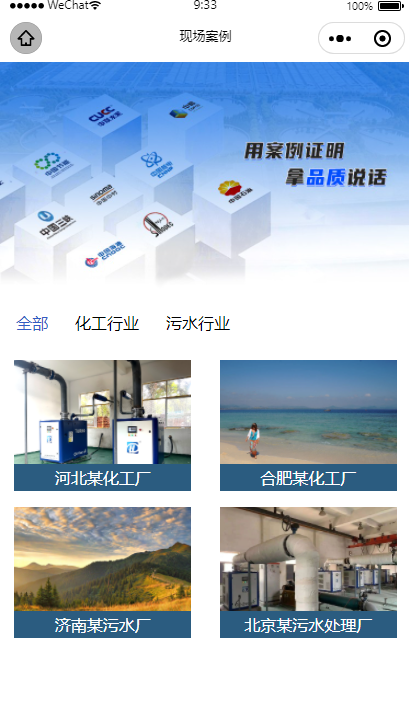
微信小程序wxml
<view class="cate">

      <scroll-view scroll-x   show-scrollbar  style="width: 100%;height: 100rpx; white-space: nowrap;">
        <view class="cate_item   {{idd==actions?'active':''}}"  data-index="999" data-id="999"  bindtap="find_item"     style="display: inline-block;margin-left: 30rpx; ">全部</view>

          <view class="cate_item  {{item.id==actions?'active':''}}"  wx:for="{{data}}" wx:key="id"   wx:for-item="item"  data-id="{{item.id}}"  data-index="{{index}}"  bindtap="find_item"   style="display: inline-block;  "  >{{item.name}}</view>

    </scroll-view>

</view>

<view class="Atlas">

     <block wx:if="{{actions == 999}}">

       <view class="Atlas_item"    wx:for="{{anli}}" wx:for-item="items"  wx:key="id"      >
              <image   bindtap="previewImage"   mode="aspectFill"      src="https://xcx.huadongmaglev.com/{{items.pic}}"  alt=""  >  </image>
              <view  class="Atlas_item_positi" >
                {{items.name}}
              </view>
        </view>

      </block>

      <block wx:else="">

        <view class="Atlas_item"    wx:for="{{data[curIndex].list}}" wx:for-item="items"  wx:key="id"      >
                <image   bindtap="previewImage"   mode="aspectFill"      src="https://xcx.huadongmaglev.com/{{items.pic}}"  alt=""  >  </image>
                <view  class="Atlas_item_positi" >
                  {{items.name}}
                </view>
          </view>

      </block>


</view>
wxss
/*分类*/
.cate{
  height: 100rpx;
  line-height: 100rpx;
  width: 100%;
}
.cate_item{
  margin-right: 50rpx;
  height: 100rpx;
}
.active{
  color: #315CC4;
}
/*滚动条*/
::-webkit-scrollbar {
  /*滚动条整体样式*/
  width: 4px !important;
  height: 1px !important;
  overflow: auto !important;
  background: #ccc !important;
  -webkit-appearance: auto !important;
  display: block;
}

::-webkit-scrollbar-thumb {
  /*滚动条里面小方块*/
  border-radius: 10px !important;
  box-shadow: inset 0 0 5px #315CC4 !important;
  background: #7b7979 !important;
}

::-webkit-scrollbar-track {
  /*滚动条里面轨道*/
  box-shadow: inset 0 0 5px rgba(0, 0, 0, 0.2) !important;
  border-radius: 10px !important;
  background: #FFFFFF !important;
}

.Atlas{
  display: flex;
  justify-content: space-around;
  flex-wrap:wrap;
  margin: 20rpx 0;
  width: 100%;
}
.Atlas_item{
  height: 240rpx;
  margin-bottom: 30rpx;
  position:relative;
  width: 43%;
}
.Atlas_item image{
  height: 100%;
}

.Atlas_item_positi{
  position:absolute;
  width:100%;
  height:50rpx;
  line-height:50rpx;
  z-indent:2;
  left:0;
  bottom:0;
  background-color: #2B5C80;
  text-align: center;
  font-size: 30rpx;
  color: #ffffff;
}
js
  /**
   * 页面的初始数据
   */
  data: {
    findList:"",
    data:"",
    actions:"",//点击的ID
    curIndex: 0,//标识
    anli:"",
    idd:999
  },

点击获取id
find_item(e){
  const id=e.currentTarget.dataset.id;//获取点击的ID
  let index=e.currentTarget.dataset.index;//标识
  this.setData({
   actions:id,
   curIndex:index
  })

 }

   /**
   * 生命周期函数--监听页面加载
   */
  onLoad(options) {
    const that  = this

       //获取初始数据
       wx.request({
        url: 'xxxxx',
        method:"get",
        success:function(res){
          console.log(res.data.haha);
           that.setData({
               anli: res.data.haha[0],
               data: res.data.haha[1]
              })
        }
      })


  },
php-api接口端
   //案例--全部
    public  function scene(Request $request){

            $list=db('scenecate')->select();//栏目
            $anli=db('scene')->select();//全部产品
            $res=[];
            foreach ($list as $k =>$v){
                $res[$k]= $v;
                $cc= db('scene')->where('cate_id', $v['id'])->select();
                $res[$k]['list']=$cc;
            }

            return json(['status'=>'success','msg'=>'获取成功','haha'=>array($anli,$res)]);
    }
很赞哦! ()